Newsletter
Get the best indie finds in your inbox
New tools, product launches, and smart offers from indie makers.

Loco turns localhost:3000 into clean URLs like myapp.local with HTTPS. Access from any device, no config needed. Share your local site with public links—like ngrok, but with a GUI. Built for devs, indie hackers, and side project jugglers.

Fraud detection and prevention with traffic quality scoring. Detects multi-accounting, account sharing and account takeover under any masking.

yapyap records your meetings and turns them into clean, searchable transcripts: who said what, the decisions, and the action items.

Full X/Twitter routine on autopilot: replies, posts, reposts, DMs. Scale to 1,000 organic replies/day. Every day you wait, they grow.

One post, eight networks. Write it once and schedule across Facebook, X, Instagram, YouTube, TikTok, LinkedIn, Threads, and Bluesky.

Turn any menu into a QR ordering system with online orders, 70+ languages, and Google review collection in minutes.

StartPageHQ replaces your browser's new tab with a customizable dashboard. Add 50+ widgets - weather, news, notes, clocks, links and more - across unlimited pages, synced everywhere.
🚀 Introducing Loco – Clean & Shareable Local Dev URLs Without the Hassle As developers, we constantly spin up new projects, test features, or demo work-in-progress sites. But the experience of using localhost:3000, memorizing port numbers, and sharing awkward IPs with teammates or clients? It’s clunky, outdated, and often frustrating.
That’s why I built Loco — a macOS app that reimagines how you work with local development servers.
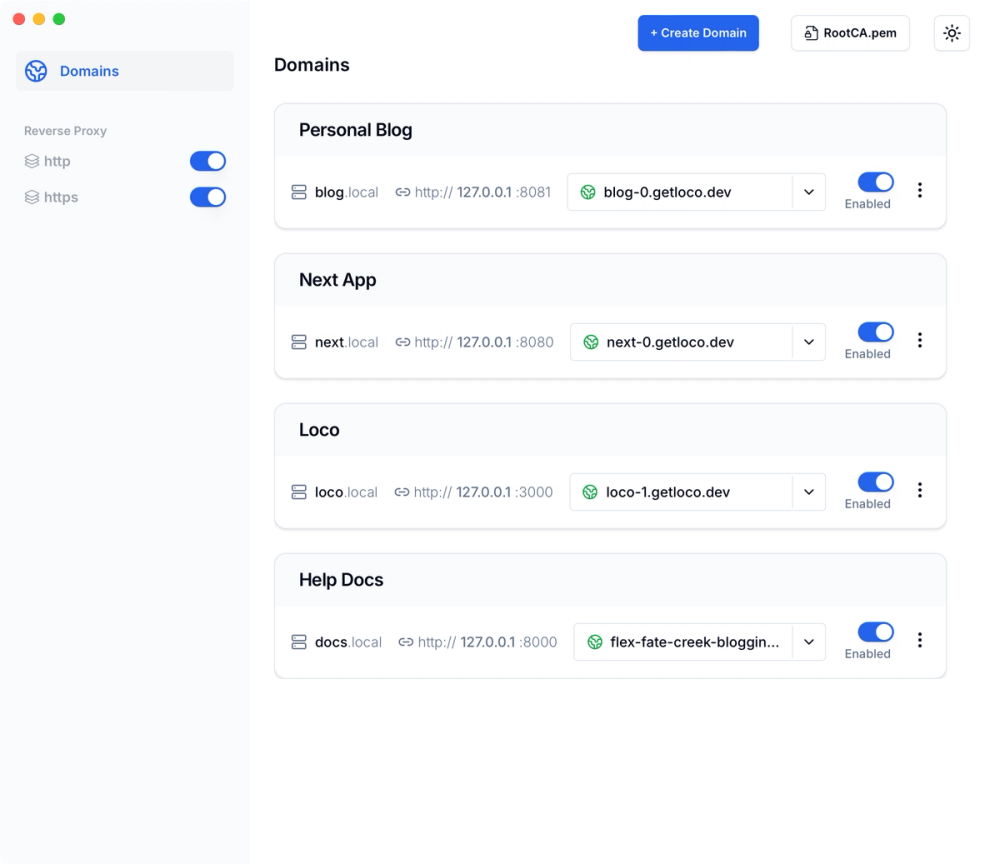
🔧 What is Loco? Loco is a lightweight macOS tool that lets you: • Replace localhost:3000 with clean, memorable URLs like myapp.local • Automatically access your local site over HTTPS • Preview your work across devices — phone, tablet, another laptop — effortlessly • Instantly share your local development server with a public link, just like ngrok • Do all of this without touching the terminal or editing any config files
💡 Why I Built It I work on a lot of side projects (probably too many 😅) and constantly switch between apps running on different ports. Testing on mobile or sharing a quick preview with someone always felt like a chore — setting up port forwarding, finding the IP, generating ngrok links, managing certs…
I wanted a smoother, more polished experience that “just works” — so I built Loco to do exactly that.
✨ Key Features • 🏷️ Custom .local domains Turn localhost:5173 into project.local, clientdemo.local, or whatever you want. • 🔐 HTTPS by default Comes with built-in SSL so you can test secure flows like OAuth without jumping through hoops. • 📱 Cross-device support Your local domain is accessible from your phone, tablet, or other devices on your network — no extra setup. • 🌍 One-click public sharing Need to share your local build with a client or teammate? Generate a public link like ngrok, right from the app. • 🧘♂️ Zero config No terminal commands. No editing your /etc/hosts. No need to remember port numbers. Just install and go.
👩💻 Who It’s For • Frontend developers who want a better local dev experience • Indie hackers juggling multiple projects • Agencies or freelancers who frequently demo work to clients • Anyone tired of localhost:3000 and looking for a cleaner, faster workflow
🛠️ Built for macOS Loco is designed specifically for macOS, with native performance and a clean interface that blends right into your dev setup. It runs quietly in the background and only shows up when you need it.
📬 Try It Out You can check it out here: 👉 https://getlo.co
Still early days, and I’m actively building based on feedback. If you try it, I’d love to hear what you think — especially what could be better or what features you’d love to see next.